The next generation of testing
It tests your site the way a
person does.
Nexus · Understudy is an AI agent that looks at the rendered page and operates it — finding copy, translation, tone, and layout issues that selectors structurally can't. No scripts. No brittle locators. And your data can stay in your own Azure tenant.
Tests like a person — no selectors, no scripts
It looks at the page and clicks. When the UI changes, there's nothing to rewrite.
Built for the tests automation can't write
Selectors check that a button works. Understudy reads the page — and tells you what's wrong with it.
Sees and clicks
Screenshots are its eyes; low-level browser commands are its hands. It perceives and operates any page, no DOM contracts required.
Localization QA
Untranslated copy, register slips (tú vs usted), anglicisms, Title-Case headings — the defects no assertion can express.
Accessibility audits
Runs axe-core — the engine behind Lighthouse's accessibility score — on every page, filing contrast, alt-text, label, and ARIA violations as findings. The discipline most testing skips.
Boxed findings
Every issue is drawn on a screenshot and filed as structured data — category, confidence, the quoted text, and a suggested fix.
Test library in folders
Team tests ship in git; your own stay local. Organize them into folders, import, export, and share across the QA team.
Secrets & trusted logins
Store a credential by name — the password never enters the prompt. Approve a login once and it remembers, per site.
Shareable deliverables
A self-contained HTML report and a branded MP4 walkthrough — ready to hand to QA or leadership.
Azure DevOps integration
Works with Azure DevOps on both on-prem Server and cloud Services. Map each test to its ADO test cases and keep them in sync with your test plans — so QA lives in the system of record your team already uses.
Runs on any Chromium browser
Built on the standard Chromium extension platform, so it runs unchanged on Chrome, Edge, Brave and other Chromium browsers — load it once and test in whatever your team already uses.
It doesn't just review — it tests
Save a review as a repeatable test. It reruns from a clean slate, scores itself pass/fail, and tells you exactly what changed since last time.
Reproducible runs
Save a review as a test. One click reruns it from a clean conversation, navigates to the same start URL, and produces a comparable run every time — no setup, no drift.
Pass / fail rubrics
Set the bar — a cap on HIGH, MEDIUM, or LOW findings, or forbid a category outright. The report shows a clear PASS or FAIL, or INCONCLUSIVE if the run didn't finish. A verdict, not just prose.
Expected outcomes
State what should be true in plain English — "the most recent order is X," "the balance dropped by $200." The agent verifies each against the page and marks it pass or fail, with the evidence it saw. Assertions, no selector in sight.
Console & network capture
It watches the page's console and network as it works — uncaught JavaScript errors, console.error, failed requests, 404s, broken images, mixed content — and files them as findings automatically. The defects a screenshot would never show.
Regression diffing
Every rerun is compared to the last by the identity of each finding, not just the count — so ten issues swapped for ten different ones still shows up. See what's new, what's fixed, and what persists.
Shareable reports
A self-contained HTML report with every finding boxed on a screenshot and the verdict up top, plus a branded MP4 walkthrough — hand-offs QA and leadership can just open.
Guardrails keep it in bounds
Autonomous, never reckless — it pauses for the actions that matter and can't touch what it's testing.
Can't run away
Every task has a hard step limit — a set number of actions the agent can't exceed before it stops itself. A backstop against a runaway loop or runaway cost. Configurable, but never removable.
Pauses for approval
Before submitting a form, logging in, or navigating to a different site, it stops and asks — the banner names the exact rule that fired. Approve a login once and it remembers, per site.
Never mutates the page
It's read-only against your site. Red boxes are drawn on the screenshot, never injected into your DOM — so it can't shift layout or perturb the thing it's testing.
Credentials stay secret
Save a login by name and refer to it by name. The password is typed straight into the field — it never enters the prompt, the model, or the report.
Closes the loop into Azure DevOps
Results don't stay in the tool. Every run flows back to the test case your team already tracks — as a real test run, with the agent's summary and the full report attached.
Automated test runs
A finished run posts a real automated test run to ADO — each test point marked Passed, Failed, or Inconclusive — right where QA reports live (Test Plans → Runs). Not a status bolted on from the side; a first-class run with history.
Summary as run comment
The agent's plain-English wrap-up — what it did and what it found — rides along as the run's comment, so anyone reading the run in ADO gets the story without opening another thing.
Report attached as PDF
The full report — every finding boxed on a screenshot, the verdict up top — is rendered to PDF and attached to the run, so it previews inline in ADO. The evidence travels with the result.
Mapped & kept in sync
Map folders to test plans and suites, tests to case IDs — on on-prem Server or cloud Services. Pull each case's title and steps to keep the test current, so your system of record stays the source of truth.
Your data stays in your tenant
Testing means sending screenshots of your app — sometimes with real customer data on the page — to an AI. So Nexus lets you run the very same Claude inside your own Microsoft Azure tenant. Your prompts and screenshots stay under your Microsoft agreement, and never reach a third party.
Claude in your Azure
Point Nexus at your own Azure AI Foundry deployment. The same Claude, the same capability — hosted where your compliance team already trusts it, billed on the Azure agreement you've already signed.
PII never leaves your walls
Screenshots and prompts go only to your Azure resource — nothing with customer data leaves your tenant. Only safety and usage metadata ever reaches Anthropic.
Or run it direct
Not regulated? Point it straight at Anthropic with your own key and start in seconds. One dropdown in Settings — set it to whatever your data policy allows.
The brain, the eyes, and the hands
One simple idea, running entirely in your browser.
The brain
A frontier LLM decides what to do next, reads each screenshot, and reasons about what's wrong.
The eyes
Live screenshots of the tab under test — the same thing a human reviewer would look at.
The hands
Low-level browser commands click, type, and scroll. It never mutates the page it's testing.
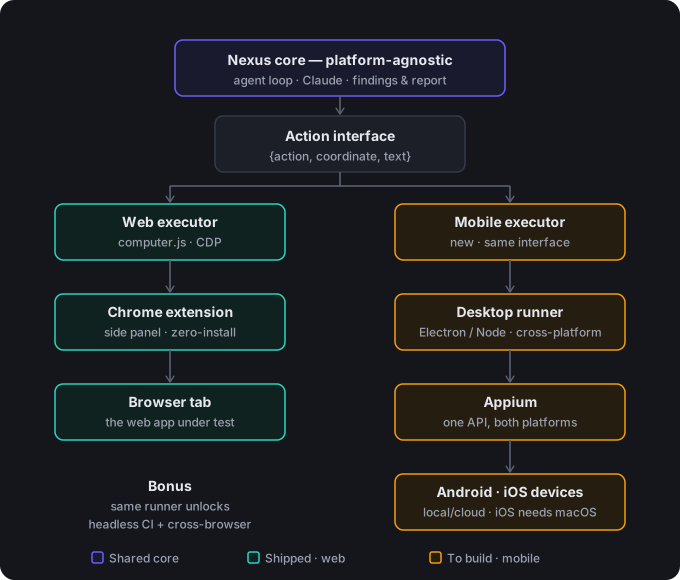
Coming soon: mobile testing
The hard part — an agent that looks at the screen and acts like a person — is already built. Mobile is the same brain on a new pair of hands.
Android & iOS
The same look-and-tap agent, driving native apps through Appium — no selectors, no brittle scripts, robust to layout churn.
The same core
Findings, rubrics, expected outcomes, regression, and the Azure DevOps loop transfer unchanged. Only the eyes and hands swap out.
Local or cloud devices
Run against local emulators and simulators, or a cloud device farm for scale. (iOS needs a Mac or a cloud device.)
CI & cross-browser too
The desktop runner that hosts mobile also unlocks headless CI runs and cross-browser (Firefox, Safari) — one engine, every surface.
See what it finds on your site
A Chrome extension. Your own API key. Nothing leaves the browser but the screenshots it reasons over.
Request a walkthrough