No selectors, no brittle scripts. Nexus looks at the rendered page, decides the next step, and operates the site — the same brain, eyes, and hands loop on every test.
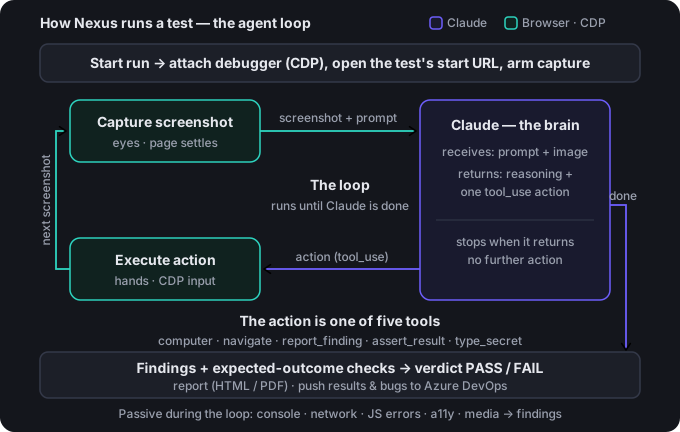
Each turn is one trip around the cycle. Nexus repeats it until the task is done.
Nexus waits for the page to settle, then freezes a frame of the live, rendered page — reading pixels the way a person would, with no DOM selectors to go stale.
The screenshot goes to the model along with the full context: your instruction, the conversation so far, the system prompt, and the schema of tools it can use.
The model reasons about what it sees and returns exactly one action to take next — a click, some text to type, a scroll, a finding to file, or a check to record.
Nexus performs it in the tab over the Chrome DevTools Protocol — real input events, including full HTML5 drag-and-drop — exactly as a user's click or keystroke would.
The page changed, so Nexus grabs a fresh screenshot and goes around again — building an audit trail of everything it looked at and did.
The task is complete — or a safety cap on the number of turns is reached. Either way, the run finishes cleanly and Nexus assembles the results.
The product is the loop — the Chrome extension is just one way to deliver it.
Reads the screenshot and decides the next move. Runs on Claude, so it understands the page like a person instead of matching selectors — and can run inside your own Azure tenant so your data never leaves.
Captures the rendered page and waits for it to settle, so Nexus never acts on a half-loaded frame or a carousel caught mid-slide.
Dispatches real input into the tab: clicks, typing, scrolling, and native drag-and-drop — driven straight through the DevTools Protocol.
Every turn, Claude returns exactly one of these.
computerClick, type, scroll, or drag at a point on the screen — the core "hands."
navigateGo straight to a URL, without hunting for a link to click.
report_findingRecord an issue — boxed on the exact screenshot, with a suggested correction.
assert_resultCheck a stated expected outcome, pass or fail. This is what produces the verdict.
type_secretFill a saved credential by name — Nexus never sees or logs the value.
+ passive captureConsole errors, failed requests, accessibility, media, and exposed data — folded in automatically.
Findings while it runs, and a verdict and report when it's done.
Every issue boxed on the exact screenshot where Nexus saw it, with the quoted text and a correction.
A rubric turns findings and expected-outcome checks into a deterministic pass or fail — and diffs against the last run.
A self-contained HTML or PDF report, plus one-click push of results to test cases and bugs to Boards.
Point Nexus at a page and watch it look, decide, and act — one turn at a time.
Get in touch Read the prompting guide